
Morphological Closing
Dilation followed by erosion fills small dark holes and gaps between bright shapes. It is used to connect broken regions and tidy up segmentation masks in image analysis.
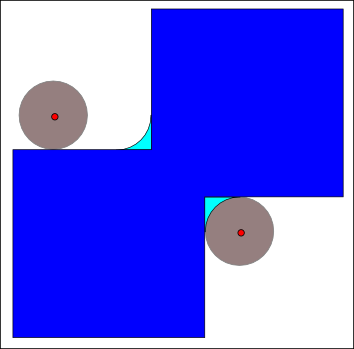
Spot it
- 01Dark holes filled
- 02Gaps bridged
- 03Merged bright regions
Why it happens
The image is dilated, which grows bright regions and fills small gaps, then eroded to shrink shapes back, keeping the filled holes and bridged cracks.
Recreate it in Pixio
Image edit prompt“Apply morphological closing to this image: small dark holes, cracks and thin gaps filled in, nearby bright shapes merged together, dark fine detail erased, smooth blobby bright areas, strong edges otherwise preserved. Keep the original subject and composition.”
Open PixioUpload your image and pick an image-edit model.